Sharing
Sharing lets you send content to another user through a share link.
You can share individual Library entries, characters, or an entire game system.
Sharing is explicit and per-item. Your Library is never shared as a whole, and content only leaves your account when you share it.
Content Identity
Every Library entry has a stable ID, assigned when the entry is created. The ID never changes, no matter how often the entry is renamed or edited.
Identity is never based on the name. Two entries can have the same name and still be unrelated, such as a built-in spell and a homebrewed spell you wrote yourself. Rollplay treats them as separate content because their IDs differ.
Everything described below is based on this ID.
Editing Existing Content
When you edit content you own, the edit is applied in place and the ID stays the same.
Every existing reference to that ID reflects the change automatically: the Classes that grant it, the Effects that target it, and any other content that includes it.
Nothing is duplicated or forked. References store the ID, so they resolve to the edited content without any further action.
Creating New Content
Creating new content assigns a new ID. The new entry is unrelated to any existing entry, even when it has the same name.
To create content that stays linked to an original, use a Variant instead. A Variant keeps a reference to the content it was created from.
What Can Be Shared
- Library content: Races, Classes, Feats, Conditions, Items, and Spells
- Characters: a full character sheet
- Game systems: a complete Creator Tools system, including its attributes, layouts, dice rolls, and Library
Dependencies
Anything you share includes everything it depends on. The share is assembled by following every reference the content holds, so the recipient receives a set that works without any further setup.
Sharing a Class also shares the Feats it grants, the Conditions those Feats apply, and the Spells attached to them.
Sharing a character shares the content that character uses. If the character wields a homebrewed axe, the axe is part of the package, along with its Race, Class, Feats, Conditions, and Spells.
How Dependencies Travel
Dependencies are gathered in one of two ways, depending on whether you have touched them.
- Untouched content is referenced. A built-in Fireball you never edited travels as a pointer to the game system it came from. The recipient's app resolves that pointer and fetches the system if they do not have it yet.
- Content you created or modified is packaged. Edit that Fireball, or write your own from scratch, and the full entry rides along inside the share.
This keeps shares small. A Class built on an existing game system carries your work, not a second copy of the system underneath it.
A share always resolves to a complete, working set of content, either from the package itself or from the game systems it points at.
Info
A share is a snapshot taken when the link is created. Editing the content afterwards does not update anyone who already imported it. Share it again to distribute the newer version.
Importing
When shared content is imported, each incoming item is matched by ID against the recipient's Library.
- No matching ID: the item is added as a new, independent entry. It can then be edited, shared, or used as the base for a Variant like any other content.
- Matching ID, identical content: nothing changes.
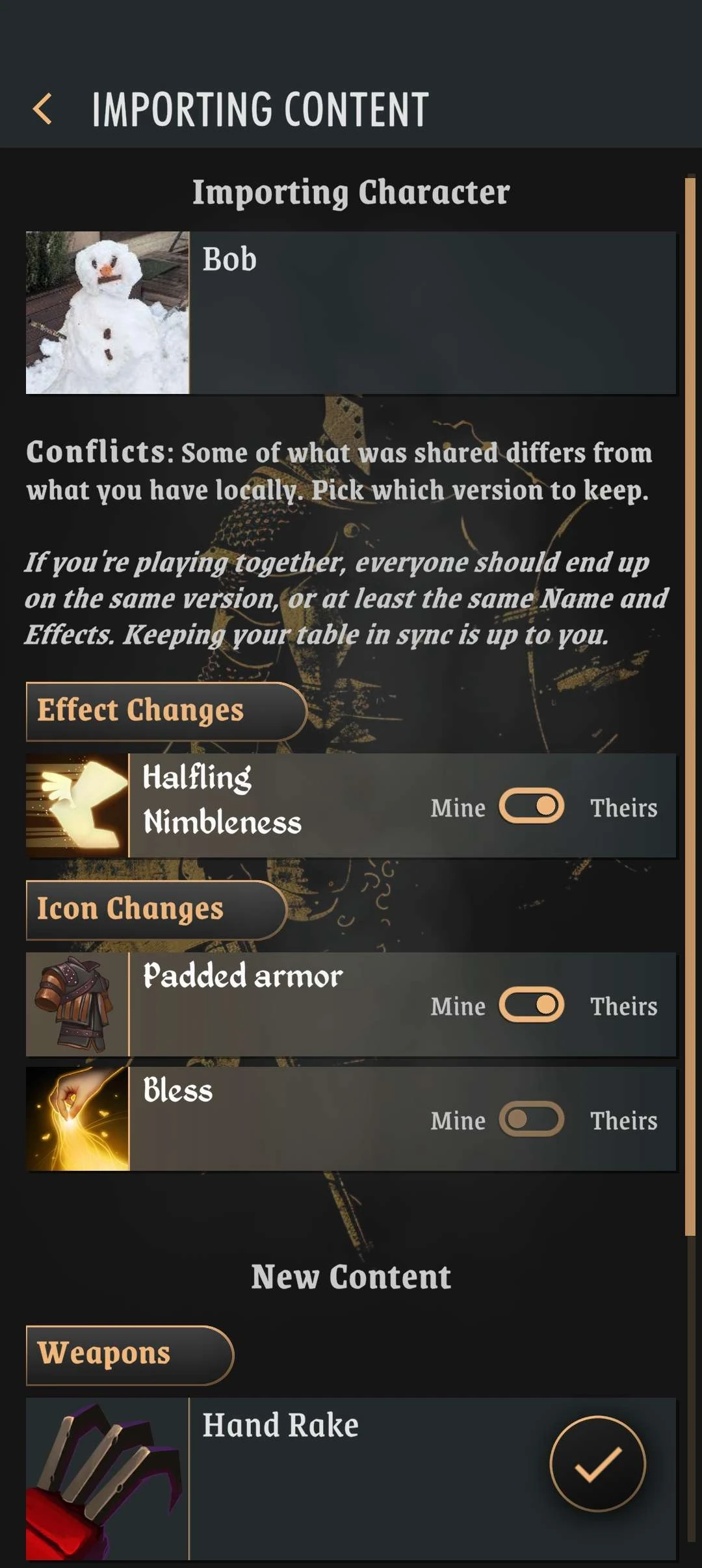
- Matching ID, diverged content: a conflict prompt is shown.
Resolving Conflicts
A conflict prompt offers two options: keep the local version, or accept the incoming one.
The choice is all-or-nothing per item. There is no field-level merge, so parts of both versions cannot be combined into a single entry.
Each item in a share is resolved on its own, which means you can accept an incoming Class while keeping your own version of a Feat that Class grants.
Import review:
Accepting a Version
References between content are stored as IDs, not as copies of the content itself. A Class that grants a Feat holds that Feat's ID, and reads the entry filed under it whenever the Feat is needed.
Accepting an incoming version replaces the entry filed under that ID. The references are left untouched: they still hold the same ID, so they now read the accepted version instead of the previous one.
Info
Nothing that points at the content is rewritten when you accept a version, so an import cannot leave a Class granting a Feat that no longer exists. The ID a reference holds always resolves, it simply resolves to whichever version is currently filed under it.