Dice Rolls
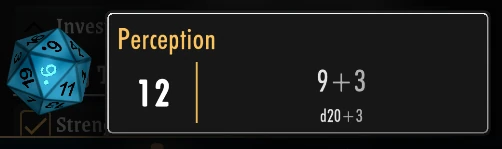
Dice Rolls define how a Player rolls for an attribute when they tap it in the app.
They are the rules that turn an attribute's value into a roll result.
This is a distinct concept from the attribute itself:
| Concept | What it is | Example |
|---|---|---|
| Numeric Attribute | A single number on your character | Strength: 14 |
| Dice Pool | A physical handful of dice, optionally with modifiers | 2d6 + d10, or 4d8 + 4 |
| Dice Roll | The rules for how to roll when tapping an attribute | Roll d20 + x (where x is the attribute's value) |
Info
Players don't configure Dice Rolls — they just tap an attribute and it rolls automatically. The Creator defines the rolling rules.
Default Roll
Currently, a single Default Roll is configured per game and applies to all attributes.
For Numeric Attributes
The default roll defines what dice to roll when tapping any numeric attribute.
The character x represents the attribute's value.
d20 + x— Roll a d20 and add the attribute's value (standard D&D-style roll)
For Dice Pools
The default is to roll the Dice Pool itself.
Here, x represents the Dice Pool to be rolled.
roll(x)— Roll the dice in the pool
Dice Modifiers
Dice Rolls support special modifiers that change how dice are rolled:
Explosive Dice (!)
A die "explodes" when it rolls its maximum — you roll again and add the result.
d20!— explode on max (20)
d20!>15— explode on any roll over 15
Reroll (r)
Automatically reroll dice that land on a 1.
d20r— reroll 1s
d20r<5— reroll any result under 5
Keep Highest / Keep Lowest (kh / kl)
Roll extra dice but only keep the best (or worst) results.
4d6kh3— roll 4d6, keep the highest 3 (common for D&D ability score generation)
5d12kl2— roll 5d12, keep the lowest 2
Per-attribute Dice Roll customization is planned for a future update.