Macro Support
Rollplay supports Macros in most text fields, written between square brackets: [ ].
They're evaluated on the Player Character, and if the macro is valid, everything between the brackets is replaced. Macros cover three things:
- Link content.
[Fireball]becomes a link to the Fireball spell, and tapping it opens the entry. This works for anything in the Library: Spells, Feats, Conditions, Classes, Items and so on. - Show real values. Instead of writing "Proficiency plus your Strength Modifier" and leaving the maths to the player, write
[Proficiency + STR]and the sheet shows the actual number. Anything that works in a Formula works here. - Roll dice in place.
[4d20]becomes a roll the player can tap. Rolls can include your stats too, so[d20 + DEX]rolls a d20 and adds the character's Dexterity. See Dice Formulas for everything a roll can contain.
Here's the same text as you write it, and as the player sees it:
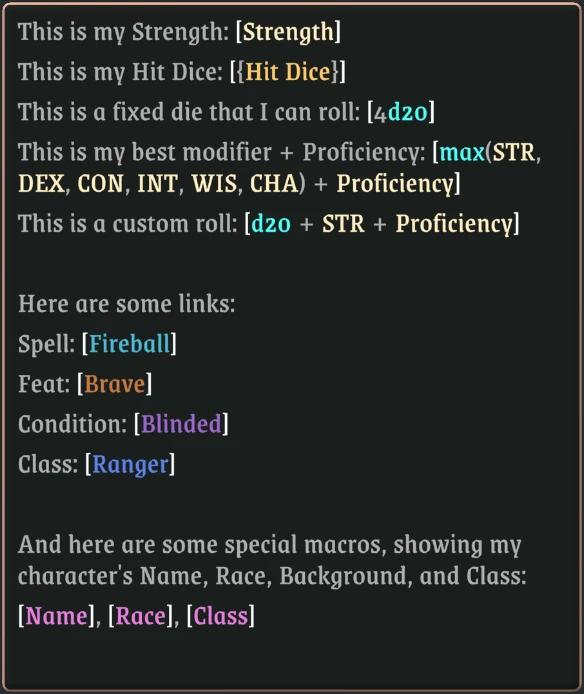
Writing the macro
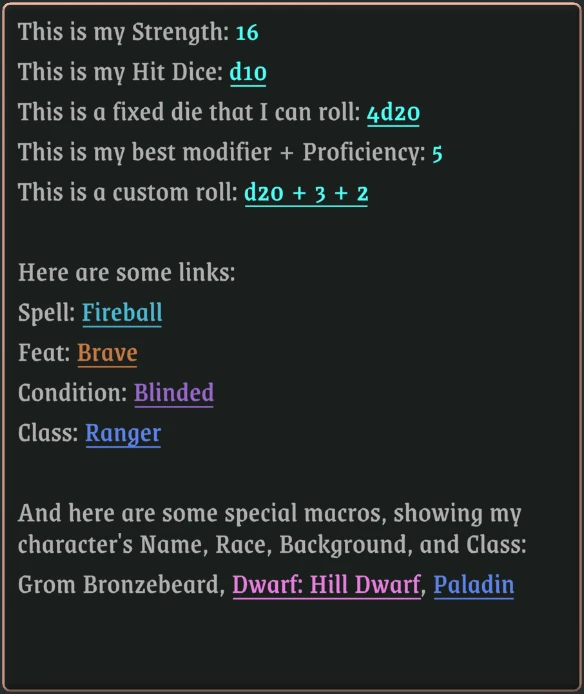
Reading the macro
Macros that use stats need a character to evaluate on, so the same macro shows up in one of three ways:
- While editing, you see the stat names as you wrote them:
[Proficiency + DEX]. - With a character loaded, the macro is evaluated and you only see the highlighted result, like
4. - With no character loaded, there's nothing to evaluate on, so the stat names stay as they are in edit mode:
[Proficiency + DEX].
We also provide a few special macros, such as:
[Name]-> Character Name[Race]-> Character Race (works for any defined Identity)[Class]-> Character Class
Autocomplete
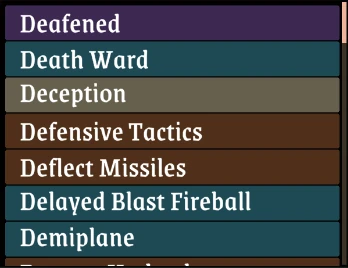
You don't need to remember the exact name of every spell or attribute. Start typing inside the brackets and Rollplay suggests matching attributes and Library content, color-coded by type, so you can tell a Condition from a Spell or a Feat at a glance.