Increase / Decrease
Increase and Decrease effects add or remove Bonus Value from an attribute.
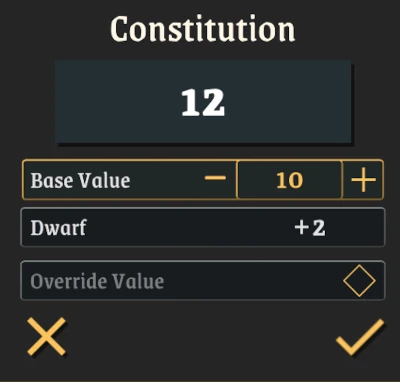
Unlike modifying the Base Value directly, Bonus Values are tracked separately — the Player can inspect any attribute and see exactly where each modifier comes from (e.g. "Strength has a +1 from the Dwarf racial effect").
When to use Set vs Increase?
Reach for Increase first. It is the right answer for almost everything, and the reason is the Player: an Increase shows up in the attribute's breakdown as "Speed +25 from Dwarf", so the Player can see where every point came from. A Set only changes the number. The breakdown has nothing to show, and the Player cannot tell the value apart from one they typed in themselves.
A Dwarf's base Speed of 25 could be written either way, and Set would not be wrong. Increase still wins, because it leaves a trail.
Two cases genuinely call for Set:
- Attribute Inputs. Increase cannot target them at all. An Input usually accepts a small fixed set of values, such as a Proficiency of 0, 1 or 2, and stacking bonuses on top would push it out of range. Granting proficiency is a Set, and there is no decision to make.
- Values that are not built out of bonuses. Current HP, or a resource like Energy, follows its own formula and its maximum rather than a pile of modifiers.
Set HP to {Max HP}orSet Energy to 0is how you refill or clear one. You are not handing out a bonus, so the breakdown is not where that belongs.
Stacking
Multiple Increase/Decrease effects on the same attribute stack with each other.
Each one is tracked independently, and the attribute's total reflects all active bonuses.
Reversibility
When the source of an Increase or Decrease effect is removed (e.g. unequipping an item, removing a class), the corresponding Bonus Value is cleanly reverted, and the attribute's total updates automatically.
Attribute Groups
Instead of targeting a single attribute, an Increase/Decrease effect can target an Attribute Group (e.g. "Skills").
When targeting a group, the Player is prompted to choose one or more attributes from that group to apply the effect to.
Info
All effects support multiple choices — the Creator can configure how many attributes the Player picks. When targeting an Attribute Group, the default is a choice of any attribute within that group.
Limitations
Increase/Decrease effects cannot target Attribute Inputs (such as a skill's Proficiency toggle).
Because inputs often have a constrained value range (e.g. 0–2), allowing bonus stacking on them could produce invalid states. Use a Set effect to modify inputs instead.