Dice
Dice show up in three places in Rollplay. They are all written the same way, but each one does a different job:
| What it does | Example | Where it's used | |
|---|---|---|---|
| Dice Roll | Rolls dice and gives a result | d20 + x, [d20 + DEX] |
Every time a Player taps an attribute, or a roll written in a Macro |
| Dice Formula | Builds a Dice Pool. Nothing is rolled. | [Level]d8 |
A Dice Pool's formula or default value |
| Dice Operator | Reads a number out of a Dice Pool | max({Hit Dice}) |
Any numeric Formula |
A Dice Pool is an attribute made of dice, like Hit Dice or a Luck Die. See Attributes for how they work on the character.
Writing Dice
Dice are written in the standard NdS format, where N is the number of dice and S is the number of sides:
2d6- two six-sided dice
d10- one ten-sided die
2d6 + d10- two d6s and a d10
d8 + 4- one d8, plus a fixed bonus of 4
You can combine multiple Dice Pools by referencing them directly in a formula:
{Weapon Damage} + {Bonus Damage}- adds two dice pools together
Dice Rolls
A Dice Roll is dice actually being rolled, with a result at the end. Players roll every time they tap an attribute, and every time they tap a roll written in a Macro, like [d20 + DEX].
Modifiers
Modifiers change how dice are rolled. They work everywhere dice are written: in rolls, in Macros, and in Dice Formulas.
Explosive Dice (!)
A die "explodes" when it rolls its maximum — you roll again and add the result.
d20!- explode on max (20)
d20!>15- explode on any roll over 15
Reroll (r)
Automatically reroll dice that land on a 1.
d20r- reroll 1s
d20r<5- reroll any result under 5
Reroll Once (ro)
Like Reroll, but each die is rerolled at most once, and the new result stands even if it lands on the same face.
d20ro- reroll 1s, once
d20ro<5- reroll any result under 5, once
Keep Highest / Keep Lowest (kh / kl)
Roll extra dice but only keep the best (or worst) results.
4d6kh3- roll 4d6, keep the highest 3 (common for D&D ability score generation)
5d12kl2- roll 5d12, keep the lowest 2
Count (c)
Count how many dice land on a face that meets a condition, instead of adding them up.
4d10c>6- roll 4d10 and count how many land on 7 or higher
6d6c<3- roll 6d6 and count how many land on 1 or 2
Unlike ! and r, c always needs a condition. A c with nothing after it is invalid.
Explosive, Reroll, Reroll Once and Count all accept the same comparisons.
Success Checks
Add a comparison after a roll, and the result is checked against a Formula at the moment you roll. The roll then succeeds or fails instead of only giving a number.
d20 < x + INT- roll a d20, and succeed if the result is less than the attribute's value plus INT
d20 + x >= 15- roll a d20, add the attribute's value, and succeed on 15 or more
Attribute Rolls
The Creator decides what happens when a Player taps an attribute. In these rolls, x is the value of the attribute being rolled, and nothing else.
Warning
This x is not the Player Input x from Formulas. An attribute roll can't read the Player's input.
Default Roll
The Default Roll applies to every attribute that doesn't have a Custom Roll of its own. It's optional, and can be left empty.
For Numeric Attributes
The default roll defines what dice to roll when tapping any numeric attribute.
The character x represents the attribute's value.
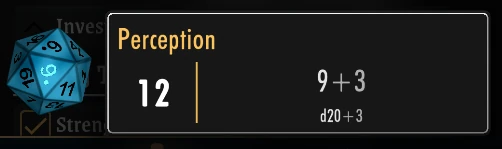
d20 + x- Roll a d20 and add the attribute's value (standard D&D-style roll)
For Dice Pools
The default is to roll the Dice Pool itself.
Here, x represents the Dice Pool to be rolled.
x- Roll the dice in the pool
Custom Rolls
Any attribute can have a roll of its own, set in its Roll field, which replaces the Default Roll for that attribute. Custom Rolls use x, Modifiers and Success Checks the same way:
2d20kh1 + x- roll two d20s, keep the higher one, and add the attribute's value
d20 < x + INT- roll a d20, and succeed if the result is less than the attribute's value plus INT
Dice Formulas
Dice Formulas produce a Dice Pool.
They are used wherever you need to define or compute a Dice Pool dynamically, such as Hit Dice, Weapon Damage, or Spell Damage.
Dynamic Dice with Macros
Often, you want a dice expression where the number of dice or the dice size depends on an attribute.
You can't write Strength * d10 — that would try to evaluate everything as a number.
Instead, use a Macro: wrap a formula in [ ] to evaluate it to a number first, and then use it as part of the dice expression.
Number of dice from an attribute
[Strength]d10
Evaluates Strength to a number (e.g. 4), producing 4d10.
Dice size from an attribute
d[lookup(Constitution: 4, 4, 6, 8, 10, 12, 20)]
Uses a lookup to convert Constitution into a dice size.
For Constitution 0 or 1 → d4, for 2 → d6, for 3 → d8, and so on.
Both at once
[Strength]d[lookup(Constitution: 4, 6, 8, 10, 12)]
Strength determines how many dice, Constitution determines their size.
Info
Inside the [ ] brackets, you write a regular Formula — references, operators, functions, and lookups all work.
Conditional Dice
You can use the conditional operator to choose between different Dice Pools:
Tired > 0 ? {Exhausted Die} : {Rested Die}
If the character's Tired attribute is above 0, use their Exhausted Die pool; otherwise use the Rested Die pool.
This works because when a formula references a Dice Pool, the result is itself a Dice Pool.
Default Values for Dice Pools
You can use a formula to set the default value of a Dice Pool.
A common use case is initializing current dice from a maximum:
Default Value for Hit Dice:
{Max Hit Dice}
This ensures a character's Hit Dice start equal to their Max Hit Dice.
Dice Operators
Dice Operators let you extract a numeric value from a Dice Pool.
This is useful when you need a number derived from a Dice Pool, rather than the pool itself.
They share their names with the Functions you use on numbers, but do something different when given a Dice Pool: count(Skills) counts the Skills that aren't zero, while count({Hit Dice}) counts the dice in the pool.
min({Hit Dice})- the minimum the pool can roll (also equals the number of dice, since each die rolls at least 1)
max({Hit Dice})- the maximum the pool can roll (e.g. 4d8 returns 32)
avg({Hit Dice})- the average roll, rounded up
roll({Hit Dice})- a random value, rolled on the spot
count({Hit Dice})- the number of dice in the pool
Warning
Using a raw die like d8 in a numeric formula will roll it immediately and return a random number. This is usually not what you want — use Dice Operators on a Dice Pool instead for predictable results.
Tip
For further assistance with writing dice formulas for your games, contact us and we'll help you out!